Inbox AI Employee Kit · €19 · secure Stripe checkout

Catch missed leads and follow-ups before they cost you money.

A practical inbox workflow kit for service businesses that need quote requests, warm leads, support questions, and stale follow-ups turned into a daily approval list.

OpenClaw is required. If you already have it, run the Inbox setup file for Windows, Mac, or Linux. If not, use the free OpenClaw setup guide first, then run the Inbox setup file to create the SOPs, prompts, examples, memory rules, and approval boundaries your AI employee needs.

Find missed moneySurface leads and follow-ups.
Prepare repliesDraft the next step faster.
Keep controlYou approve before anything goes out.

Self-serve digital download for OpenClaw users. Built for owner-led service businesses that need a safer inbox review loop, not blind automation.

Service businessesFor owners who sell through calls, quotes, appointments, or client threads.
Quote requestsExtract scope, urgency, and follow-up questions before you reply.
Warm leadsSpot messages that need fast action before they go cold.
Daily reviewTurn inbox noise into a clean owner approval list.

Not sure if your inbox fits?

The kit works best when your inbox already contains repeat patterns: quote requests, booking questions, support replies, follow-ups, and leads that need a next step.

If you are unsure, use the free setup guide first and compare your inbox against the checklist before buying. You should be able to name at least one repeat workflow you want the AI to prepare for owner approval.

Good fitYou sell services, quotes, calls, projects, bookings, or support through email.
Good fitYou regularly think, "I need to reply to that later," then lose the thread.
Good fitYou want summaries, draft replies, risk flags, and follow-up reminders before sending anything.
Bad fitYou want an AI to send customer replies automatically without review.

The job is narrow on purpose.

The first AI employee should not run sales or handle every customer automatically. It should own a clear preparation workflow and stop before risky decisions.

Checks the inbox

Reviews customer messages, booking requests, quote questions, support issues, and warm leads.

Prepares the work

Turns scattered messages into summaries, priorities, tasks, missing details, and draft replies.

Stops at the boundary

Flags anything sensitive and waits for human approval before customer-facing commitments go out.

What the setup creates

No developer puzzle. The kit turns plain business answers into a reusable OpenClaw inbox workspace.

Workspace files

A named Inbox AI Employee workspace with role, memory notes, SOPs, examples, and clear operating boundaries.

Reusable inbox workflow

Prompts and checklists for summaries, urgency labels, missing details, draft replies, follow-ups, and daily review.

Approval rules

A practical risk matrix so refunds, pricing, promises, sensitive details, and unusual customer requests are escalated.

How the workflow runs

Use it as a review loop, not as blind automation.

1
Collect the messagesPaste or connect the relevant inbox context into OpenClaw.
2
Ask for the inbox reviewThe AI summarizes, labels urgency, extracts tasks, and drafts suggested replies.
3
Review the risk flagsAnything involving refunds, prices, commitments, sensitive info, or legal/medical/financial claims is escalated.
4
Approve before sendingYou decide what actually goes to customers.

See the AI employee's work before you trust it.

This is a preview of a possible review surface for the workflow. The €19 download includes the inbox workflow files, prompts, SOPs, and approval rules, not a live dashboard app.

Inbox Proof Dashboard
Last run: today at 09:12 · Mode: draft and approve
Ready for owner review
18messages checked
5draft replies prepared
2approval decisions needed
1follow-up at risk
D
Draft prepared for warm leadQuote request summarized with scope, deadline, missing details, and suggested next reply.
09:12
A
Owner approval requiredCustomer asked for a discount and delivery promise. The AI stopped before committing.
09:08
S
SOP note savedNew rule added: refund requests must be summarized and escalated before a reply is drafted.
08:57
!
Follow-up risk foundA lead from two days ago has no next step. Suggested reminder is waiting for review.
08:43
Preview, not included softwareThe kit gives you the workflow pieces. A live dashboard like this would be a future add-on, not part of the self-serve download.
Built for trustThe owner can see what happened before giving the AI more responsibility.
Built for handoffEvery draft, flag, and saved rule becomes a clean review item instead of a vague chat transcript.
Starts with inboxThis layout shows where the Inbox workflow can go without pretending the basic pack includes custom software.

Proof before you buy

These are real preview screens from the Inbox kit flow: setup questions, workspace creation, approval rules, and before/after inbox handling.
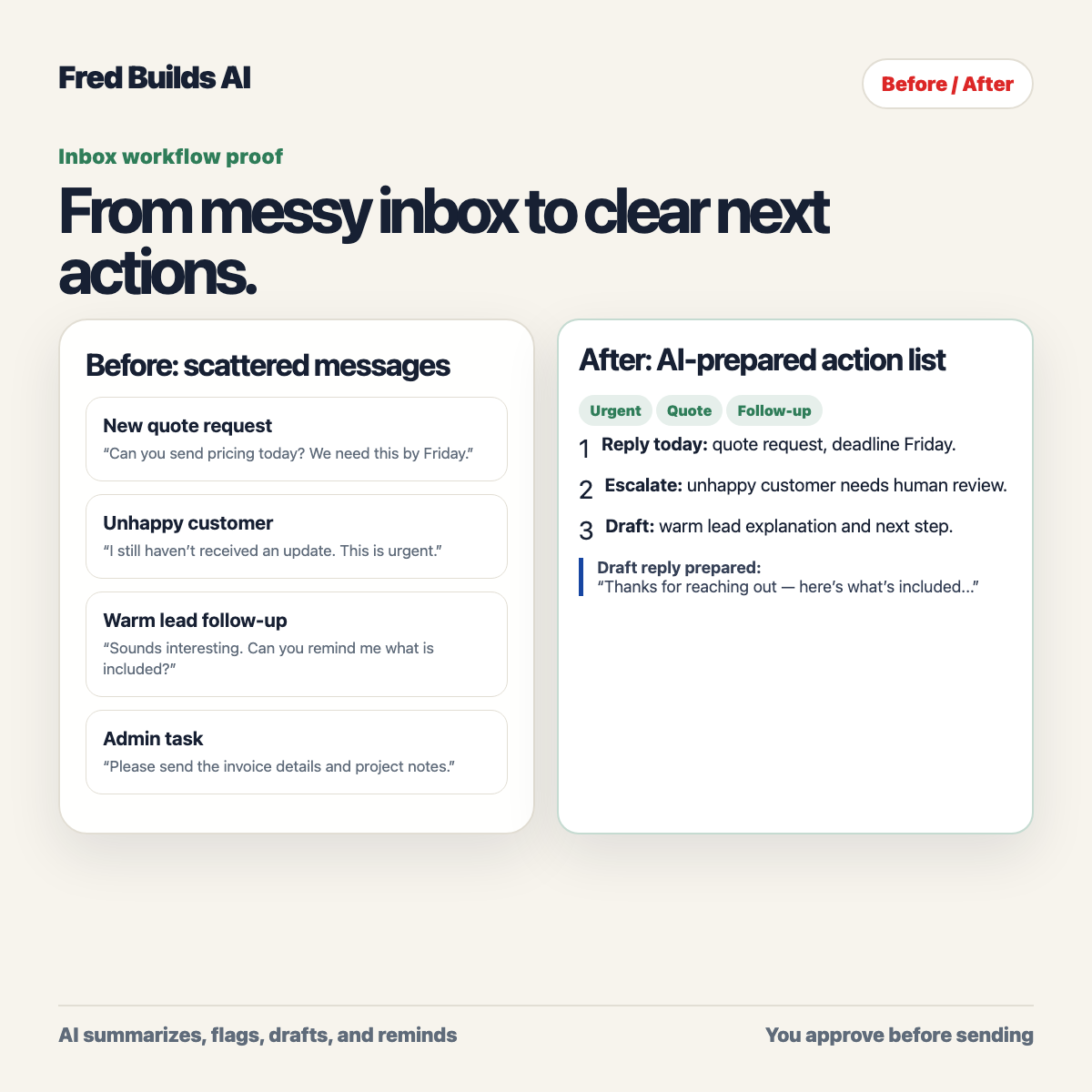
Before and after inbox workflow preview
Before/after example: messy customer messages become a review-ready approval list.
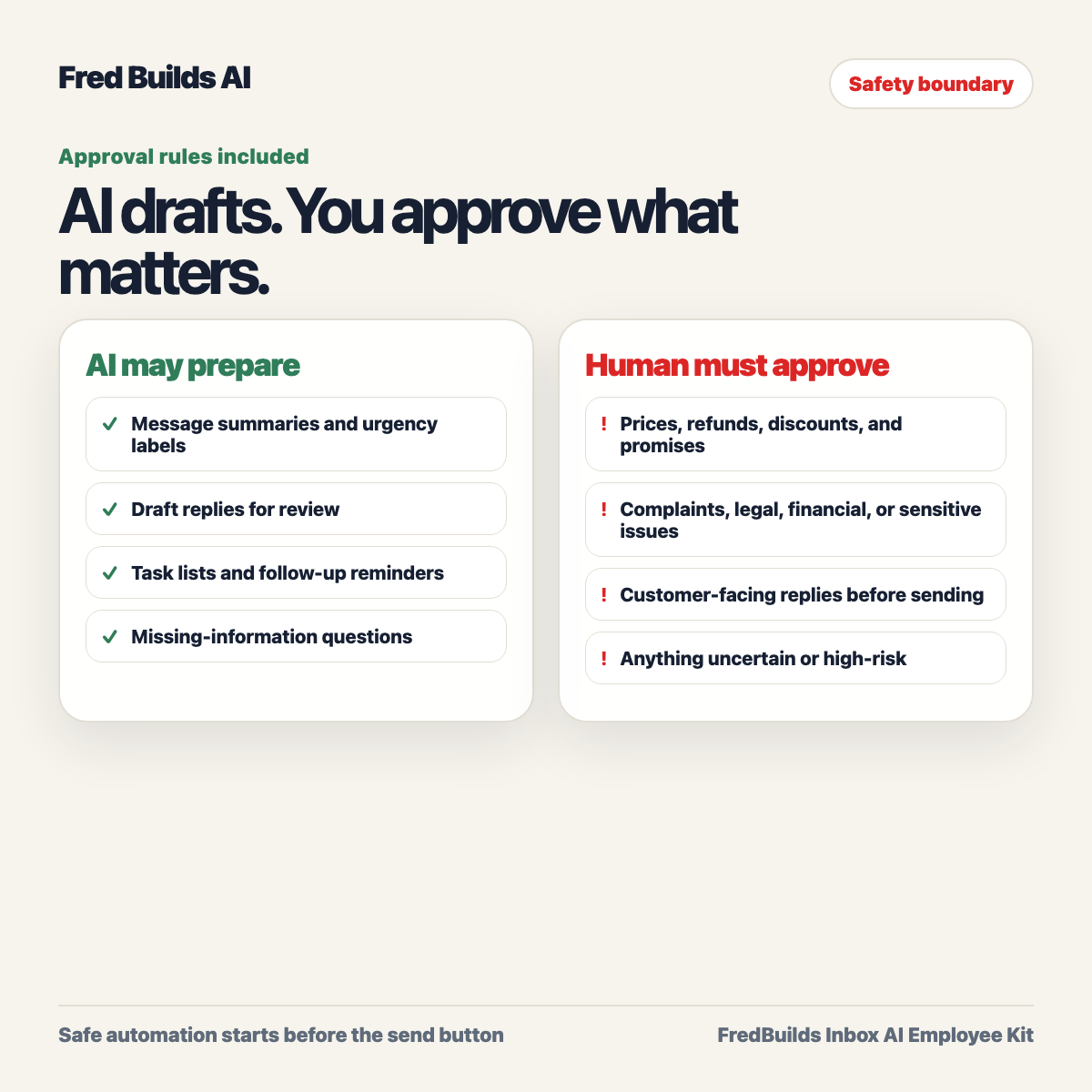
Inbox approval rules preview
Approval rules define where the AI stops and asks the owner before anything risky happens.

What happens after you buy?

The Inbox AI Employee Kit is a €19 downloadable product. It gives you a guided path from purchase to a reusable inbox review workflow inside your own OpenClaw setup.

Guided intakeAnswer plain questions about inbox categories, risks, and follow-up moments.
Approval boundariesDefine what the AI may draft, what it must flag, and what only the owner can decide.
Reusable workflowUse the included SOPs, prompts, memory files, and daily review rhythm.

From purchase to first review

The goal is not to install another tool and wonder what to do. The kit gives you a first useful workflow to run.

1Download the kitUse the delivery email to get the files, license/order ID, and setup instructions.
2Install or open OpenClawUse your existing setup, or start with the free OpenClaw setup guide.
3Answer the inbox questionsName your message types, risky decisions, follow-up moments, and owner approval rules.
4Run the daily reviewTurn messy messages into summaries, draft replies, follow-up reminders, and decisions waiting for you.

Buy the Inbox AI Employee Kit

€19 one-time digital download. Built for one small business inbox workflow.

  • Windows, Mac, and Linux setup files
  • Quick-start checklist and setup guide
  • Inbox triage SOP and daily rhythm
  • Prompt pack, worksheets, risk matrix, approval rules
  • Full worked examples
  • License/order ID and protected download delivery

The Proof Dashboard shown above is a product preview concept. It is not included as a working dashboard app in the €19 digital pack.

Setup launcher filesClearly named for Windows, Mac, and Linux.
Employee handbookRole, boundaries, approval rules, and daily workflow.
Prompt packSummaries, draft replies, escalation, and follow-up prompts.
Worked examplesService, freelance, and ecommerce inbox scenarios.

Includes bug fixes and minor v1.x updates. One buyer / one business license. Digital product; support-first refund policy for broken access, failed delivery, or materially different delivery.

Secure Stripe checkout. After payment, the delivery flow sends your license/order ID, protected download link, version details, and setup instructions by email. If access or delivery breaks, support@fredbuilds.co is the support and refund path.
Delivery email after successful Stripe payment
License/order ID included for support
Protected 14-day download link
Support-first refund path for broken access or failed delivery
Human approval built into the workflow

Questions buyers will have

Clear boundaries reduce refunds, confusion, and bad-fit buyers.

Is the Proof Dashboard included?

No. The dashboard shown on this page is a preview of a possible review layout for the workflow. The €19 kit includes setup files, SOPs, prompts, approval rules, worksheets, and examples. A working dashboard is not included in the self-serve download.

Does this install OpenClaw?

No. The kit requires OpenClaw. If you already have OpenClaw installed, run the Inbox setup file there. If not, use the free OpenClaw setup guide first.

Does the AI send customer replies automatically?

No. The kit is designed around preparation and human approval. It drafts, flags, and reminds. You decide what gets sent.

Who is this best for?

Service business owners, freelancers, consultants, agencies, local services, and owner-led teams that handle leads, quote requests, support questions, and follow-ups from a busy inbox.

What happens after purchase?

Buyers receive a delivery email with a license/order ID, a protected download link, version details, and setup instructions. The kit then walks through collecting example inbox messages, setting approval boundaries, and running a daily review workflow.

What if the download or setup breaks?

Email support@fredbuilds.co with your license/order ID. Support focuses first on fixing access, delivery, or setup problems. If the delivered product is materially different from what was promised, use the same support path for refund handling.

Does FredBuilds offer done-for-you setup?

No. FredBuilds currently sells self-serve downloadable kits only. Buy the kit, download the files, and follow the included setup guide.